Store / US Emergency / US Police - Non Els Cars / Declasse Outlaw - US Police - Marked / Unmarked - 4 Department Liveries - NON ELS US Emergency · US Police - Non Els Cars · US Police
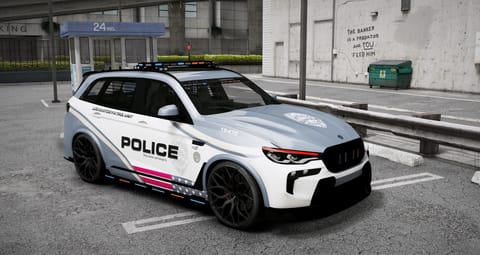
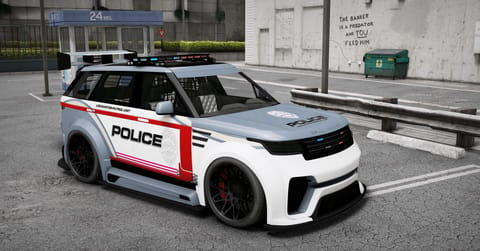
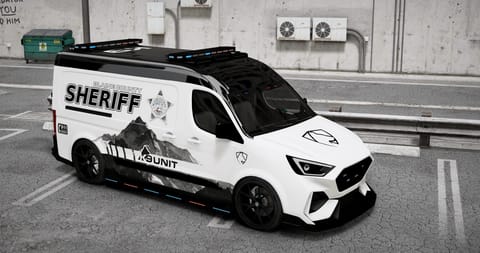
Declasse Outlaw – US Police – Marked / Unmarked – 4 Department Liveries – Non-ELS Ground-Up High-Quality Custom Build
£14.44 £16.99 one-time purchase · store sale
Buy now Build sheet from listing
POLYS 230,000
SEATS 4
SPAWN CODE outusnon
DELIVERY Instant via Tebex · Keymaster
Delivered through Tebex. Escrow-protected packages install via Cfx.re Keymaster. Support in the GXD Discord.
Package details What’s in the files Install & compatibility Version history Reviews
From the listing Ground-Up High-Quality Custom Build
Ground-Up High-Quality Custom Build Fully Cfx.re TOS Compliant & Lore Friendly Custom Wheels Starlight Roof (Extra) Plates & Badges (Extras) Custom Interior – Fully Retextured Reflective Window Mirrors 4-Seater, 4-Door Vehicle with Fully Functional Doors and Seating Fully Working Dials Custom US Non Els Lights and pattern 3 Custom Liveries with K9 Unit and 2 LSPD ones and unmarked one Lightbar Set to Extra to toggle off and on as well as Skirt Lighting and Rear outer Lighting Working Environmental and Moving Spotlight as Extras Rambar Versions and Non Rambar version Aerial As extra as well Working Animated Matrix Board goes up an down with holding H Inner barrier partition and window bars for realism Paint 1: Primary Colour Paint 2: Secondary Colour (Interior & Starlight Roof) Paint 4: Caliper Colour Paint 6: Wheel Colour Paint 7: DRL & Engine Pipes Colour YFT: 6.5MB | YTD: 2.5MB Polys: 230K Spawncode: outusnon and outusnon2 Compliance Lore friendly TOS compliant Delivered via Tebex / Keymaster FiveM ready Non-ELS setup
Install & troubleshooting This is a Non-ELS car. It uses GTA’s own lights, so no ELS script is needed.
Install (5 steps) Download the package from your Tebex account. Put the vehicle folder in your server’s resources folder. Add ensure and the folder’s name to server.cfg. Add a siren script for siren sounds (see “Sirens & sounds” below). Restart the server, then spawn the car with outusnon. Sirens & sounds Non-ELS cars use GTA’s own built-in lights. You don’t need an ELS script.
Siren sounds You need a siren script for siren sounds. It is not part of this package. A siren script lets you switch lights and sound on and off separately, and pick tones like wail and yelp. Want new siren tones? Use a siren sound pack that works with your siren script. If the lights don’t sit right Every car’s lights have a siren ID (a number). The same number must be in two files: carcols.meta and carvariations.meta. If another pack on your server uses the same number, the lights show in the wrong place or flash the wrong pattern. Fix: pick a new number that nothing else uses (up to 255) and change it in both files. New siren ID Both lines below update as you type.
carcols.meta · inside <Sirens> → <Item>Copy
<id value="241" />carvariations.meta · in the car’s entryCopy
<sirenSettings value="241" />Change it with Pack Doctor (finds and fixes clashing siren IDs). Want a different flash pattern? Build one in Signal Bench .
Problems & quick fixes Lights are in the wrong place or flash the wrong pattern Why: Another pack uses the same siren ID.
Fix: Pick a new, unused number and change it in carcols.meta and carvariations.meta. Both must match.
Open Pack Doctor No lights at all Why: The number in carvariations.meta doesn’t match the one in carcols.meta.
Fix: Make both numbers the same, then restart the server.
Open Meta Editor No siren sound, or only the basic GTA siren Why: Siren tones come from a siren script, which isn’t included.
Fix: Install a siren script and set it up for this car’s spawn code if it asks for one.
I changed the ID but nothing changed Why: Only one file was changed, or the server is still using old files.
Fix: Change both files, then restart the server. Still the same? Clear the server cache and restart.
I want a different flash pattern Why: The pattern is part of the car’s carcols.meta siren entry.
Fix: Build a new pattern and export the carcols entry.
Open Signal Bench Still stuck? Ask in the GXD Discord .
How you get it Instant delivery. Pay on Tebex and the package is licensed to your Cfx.re account through Keymaster and available to download straight away.Install. Put the resource folder in your server's resources, add ensure plus the folder name to server.cfg, restart and spawn it with outusnon. Works on ESX, QBCore and standalone servers.Updates and support. Fixes and new versions are free for everyone who owns it. If anything doesn't look right, open a ticket in the GXD Discord or see the install guide and how to add a car to a FiveM server .Free FiveM tools for this package: Signal Bench · Vehicle Registrar · Livery Workshop · YTD Resizer